Getting started
Install Audiofilus on your device, open it, and point it at your music.
Handhelds with PortMaster
Works on Knulli, muOS, ROCKNIX, ArkOS, dArkOS and EmuELEC.
- Download
audiofilus-portmaster.zipfrom the latest release. - Install it with PortMaster, or unzip it into your
portsfolder. - Open Audiofilus from Ports.
The port brings everything it needs, including the library that plays console music (libgme).
On EmuELEC the launcher goes in a different folder: see EmuELEC.
muOS, without PortMaster
- Download
audiofilus.muxappfrom the latest release. - Copy it to the
ARCHIVEfolder at the root of your SD card (or USB drive). - Open muOS's Archive Manager and install it. Audiofilus shows up under Applications.
Linux desktop
curl -fsSL https://juanvillacortac.github.io/audiofilus/install.sh | shIt installs Audiofilus into ~/.local/share/audiofilus, links audiofilus into ~/.local/bin and adds it to your app launcher (with “Open with” for audio files and folders). Run it again to update; your settings stay.
By hand: unzip audiofilus-linux-amd64.tar.gz (or -arm64) anywhere and run ./audiofilus desktop install once.
Windows
On Windows 10 or later, unzip audiofilus-windows-amd64.zip anywhere and run audiofilus.exe. Everything plays out of the box: AAC/M4A, Opus, tracker modules, console music (NSF, SPC, GBS…) and AAC or HLS radio stations included. The zip carries the decoder DLLs next to the .exe (mpg123, opusfile, libxmp and libgme from MSYS2, and fdk-aac); their licenses are in the licenses folder.
iPhone and iPad
Each release has an unsigned audiofilus-ios-unsigned.ipa. Install it with Sideloadly or AltStore, which sign it with your own Apple ID.
Or add the source https://juanvillacortac.github.io/audiofilus/altstore.json to AltStore, SideStore or LiveContainer: new releases show up there as updates.
First run: your music folder
On a handheld or the desktop, the first time you open Audiofilus it shows a folder browser. A opens a folder, B goes up and X uses the current folder. The library is scanned once, with a progress bar; later starts only read new or changed files. You can change the folder later in Settings → Folder, and rescan with Rescan.
No music of your own? Audiofilus opens anyway with an empty library, so servers, radio, podcasts and YouTube Music still work.
On iPhone, copy songs into On My iPhone → Audiofilus in the Files app, or pick any folder (iCloud Drive or another app) in Settings → Folder.
Finding your way around
- SELECT opens the screens bar (Now playing, Library, Search, Queue, Radio, Podcasts, Games, Settings…). Press it twice to go back to the previous screen.
- START opens the More menu of the screen you're on.
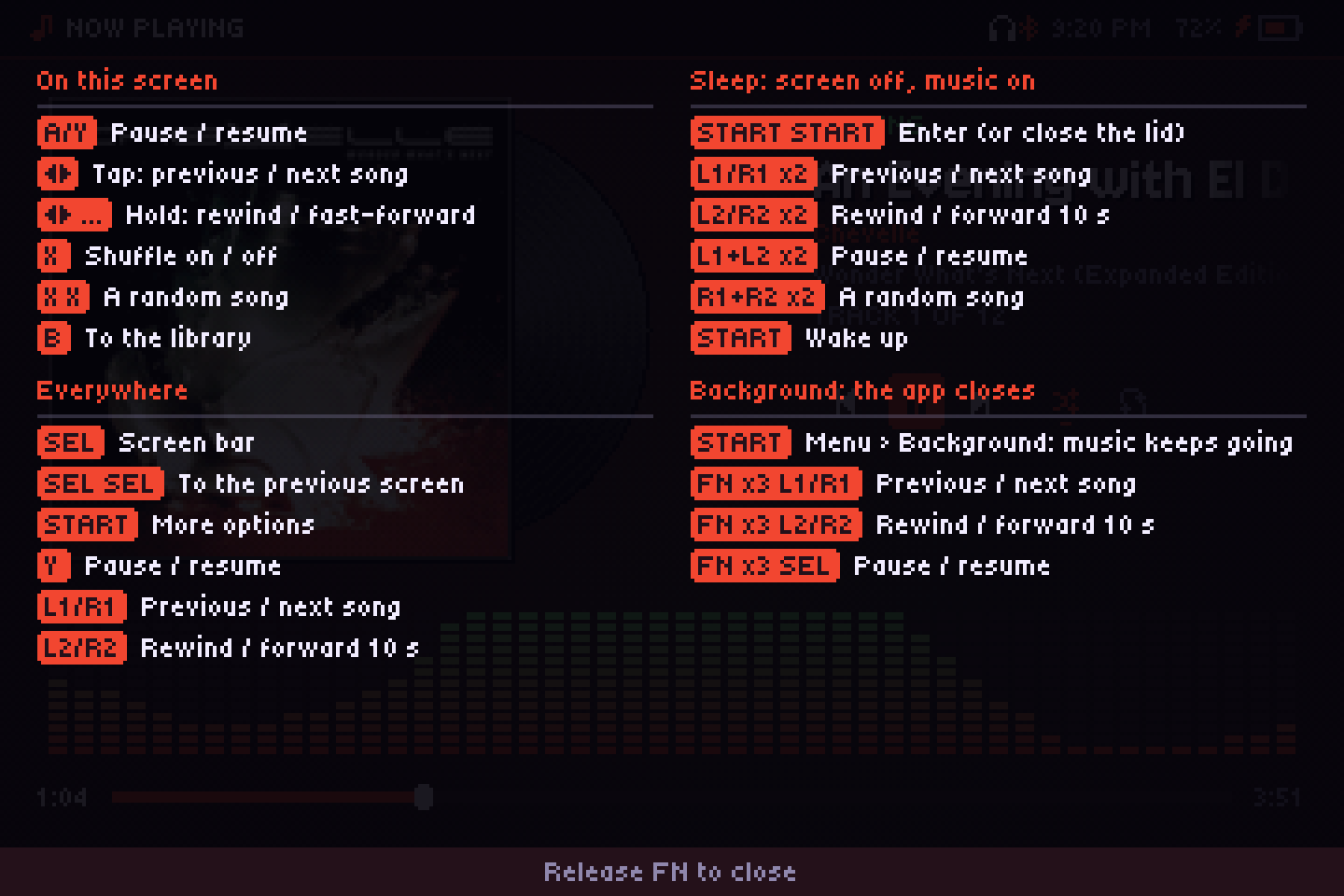
- Hold FN (F1 on a keyboard) to see what every button does on that screen.
Updating
Install the new release the same way. Your settings (audiofilus.json) and data (data/) live next to the program, so they stay.